
Bulk SMS API Integration in PHP Application
PHP Bulk SMS API Integration: Bulk SMS is a popular message service provider. It gives the facility to send bulk mobile messages over hundreds of mobile networks. One can easily use Bulk Sms service into his application by using its api, known as Bulk Sms API.
Steps to Integrate the Bulk SMS API in PHP
First thing one need to do is to create an account into bulksms.com with one mobile number and an existing email address as main prerequisites.
Here is the URL, you need for registering your account:
https://www2.bulksms.com/register/
After registering, please note down your username, password and mobile number, as these will be later used inside the api code to make it working for you.
A very important thing to mention here that, the number of api transactions is proportional to the Credits you have in your account. Initially it is zero.
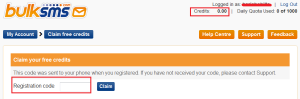
For every new user, BulkSms offers some free credits (5 credits usually), which automatically adds into your account, after you enter the registration code (sent to the registered phone number) into the text box and click Claim button. (See fig. below)
Now login into your account to get a dashboard like below.
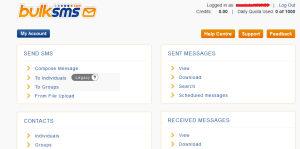
Here you can see how many messages you sent, received via Bulk SMs api and many more.
Now let us move to coding part.
Get the integration code by following the link:
http://developer.bulksms.com/eapi/code-samples/php/send_sms/
You can get a downloaded copy of the code with name int-send_sms.php or get it here:
<?php
/*
* Requirements: your PHP installation needs cUrl support, which not all PHP installations
* include by default.
*
* Simply substitute your own username, password and phone number
* below, and run the test code:
*/
$username = 'XXXXXXXXXXXX'; // username
$password = 'XXXXXXXXXXX'; // password
/*
* Your phone number, including country code, i.e. +44123123123 in this case:
*/
$msisdn = '44123123123'; // For testing put here the registered one and next time the mobile number to send over the message

/*
* Please see the FAQ regarding HTTPS (port 443) and HTTP (port 80/5567)
*/
$url = 'https://bulksms.vsms.net/eapi/submission/send_sms/2/2.0';
$port = 443;

/*
* A 7-bit GSM SMS message can contain up to 160 characters (longer messages can be
* achieved using concatenation).
*
* All non-alphanumeric 7-bit GSM characters are included in this example. Note that Greek characters,
* and extended GSM characters (e.g. the caret "^"), may not be supported
* to all networks. Please let us know if you require support for any characters that
* do not appear to work to your network.
*/
$seven_bit_msg = "Hi this is my first message using bulk sms api";

/*
* A Unicode SMS can contain only 70 characters. Any Unicode character can be sent,
* including those GSM and accented ISO-8859 European characters that are not
* catered for by the GSM character set, but note that mobile phones are only able
* to display certain Unicode characters, based on their geographic market.
* Nonetheless, every mobile phone should be able to display at least the text
* "Unicode test message:" from the test message below. Your browser may be able to
* display more of the characters than your phone. The text of the message below is:
*/
$unicode_msg = "Unicode test message: ☺ \nArabic: شصض\nChinese: 本网";

/*
* There are a number of 8 bit messages that one can send to a handset, the most popular of the lot is Service Indication(Wap Push).
* Some other popular ones are vCards and vCalendars, headers may vary depending on which of message one opts to send.
* The User Data Header(UDH) is solely responsible for determining which
* type of messages will be sent to one's handset.
* In a nutshell, SI(service indication) messages will have, in the final message body, both the UDH
* and WSP(Wireless Session Protocol) appended to each other forming a prefix of the ASCII string of the Hex value
* of the actual content. For example, suppose our intended Wap message body is as follows:
*
* <si><indication href="http://www.bulksms.com">Visit BulkSMS.com homepage</indication></si>
*
* Our headers will be -- UDH + WSP = FINAL_HEADER
* '0605040B8423F0' + 'DC0601AE' = '0605040B8423F0DC0601AE'
*
* The UDH contains a destination port(0B84) and the origin port(23F0)
* the WSP is broken down into the following:
*
* DC - Transaction ID (used to associate PDUs)
* 06 - PDU type (push PDU)
* 01 - HeadersLen (total of content-type and headers, i.e. zero headers)
* AE - Content Type: application/vnd.wap.sic
*
* For this example our 8 bit message(what becomes our Wap Push) will look like this:
* $msg = '0605040B8423F0DC0601AE02056a0045c60d0362756c6b736d732e636f6d00010356697369742042756c6b534d532e636f6d20686f6d6570616765000101';
*
* You will only get UDH for both vCard and vCalendar type of 8 bit messages and no WSP, which will look something to this effect:
* '06050423F4000'
*
* In order to convert an xml document into its binary representation (wbxml), one would need to install a wbxml library (libwbxml)
* Once that has been successfully achieved, that binary representation will then be finally converted into its hexadecimal value
* in order to complete the transaction. With that done, the appropriate headers are then appended to this hex string to complete
* the Wap Push/8-bit messaging
*
* $eight_bit_msg = get_headers( $msg_type ) . xml_to_wbxml( $msg_body );
* get_headers(...) function commented out. uncomment when you use it.
* $msg_type = 'wap_push';
* $msg_body = '<si><indication href="http://www.bulksms.com">Visit BulkSMS.com homepage</indication></si>';
*/
$eight_bit_msg = '0605040B8423F0DC0601AE02056a0045c60d0362756c6b736d732e636f6d00010356697369742042756c6b534d532e636f6d20686f6d6570616765000101';


/*
* These error codes will be retried if encountered. For your final application,
* you may wish to include statuses such as "25: You do not have sufficient credits"
* in this list, and notify yourself upon such errors. However, if you are writing a
* simple application which does no queueing (e.g. a Web page where a user simply
* POSTs a form back to the page that will send the message), then you should not
* add anything to this list (perhaps even removing the item below), and rather just
* display an error to your user immediately.
*/
$transient_errors = array(
40 => 1 # Temporarily unavailable
);

/*
* Sending 7-bit message
*/
$post_body = seven_bit_sms( $username, $password, $seven_bit_msg, $msisdn );
$result = send_message( $post_body, $url, $port );
if( $result['success'] ) {
  print_ln( formatted_server_response( $result ) );
}
else {
  print_ln( formatted_server_response( $result ) );
}

/*
* Sending unicode message
*/
$post_body = unicode_sms( $username, $password, $unicode_msg, $msisdn );
$result = send_message( $post_body, $url, $port );
if( $result['success'] ) {
  print_ln( formatted_server_response( $result ) );
}
else {
  print_ln( formatted_server_response( $result ) );
}

/*
* Sending 8-bit message
*/
$post_body = eight_bit_sms( $username, $password, $eight_bit_msg, $msisdn );
$result = send_message( $post_body, $url, $port );
if( $result['success'] ) {
  print_ln( formatted_server_response( $result ) );
}
else {
  print_ln( formatted_server_response( $result ) );
}


/*
* If you don't see this, and no errors appeared to screen, you should
* check your Web server's error logs for error output:
*/
print_ln("Script ran to completion");

function print_ln($content) {
  if (isset($_SERVER["SERVER_NAME"])) {
    print $content."<br />";
  }
  else {
    print $content."\n";
  }
}

function formatted_server_response( $result ) {
  $this_result = "";

  if ($result['success']) {
    $this_result .= "Success: batch ID " .$result['api_batch_id']. "API message: ".$result['api_message']. "\nFull details " .$result['details'];
  }
  else {
    $this_result .= "Fatal error: HTTP status " .$result['http_status_code']. ", API status " .$result['api_status_code']. " API message " .$result['api_message']. " full details " .$result['details'];

    if ($result['transient_error']) {
      $this_result .=  "This is a transient error - you should retry it in a production environment";
    }
  }
  return $this_result;
}

function send_message ( $post_body, $url, $port ) {
  /*
  * Do not supply $post_fields directly as an argument to CURLOPT_POSTFIELDS,
  * despite what the PHP documentation suggests: cUrl will turn it into in a
  * multipart formpost, which is not supported:
  */

  $ch = curl_init( );
  curl_setopt ( $ch, CURLOPT_URL, $url );
  curl_setopt ( $ch, CURLOPT_PORT, $port );
  curl_setopt ( $ch, CURLOPT_POST, 1 );
  curl_setopt ( $ch, CURLOPT_RETURNTRANSFER, 1 );
  curl_setopt ( $ch, CURLOPT_POSTFIELDS, $post_body );
  // Allowing cUrl funtions 20 second to execute
  curl_setopt ( $ch, CURLOPT_TIMEOUT, 20 );
  // Waiting 20 seconds while trying to connect
  curl_setopt ( $ch, CURLOPT_CONNECTTIMEOUT, 20 );

  $response_string = curl_exec( $ch );
  $curl_info = curl_getinfo( $ch );

  $sms_result = array();
  $sms_result['success'] = 0;
  $sms_result['details'] = '';
  $sms_result['transient_error'] = 0;
  $sms_result['http_status_code'] = $curl_info['http_code'];
  $sms_result['api_status_code'] = '';
  $sms_result['api_message'] = '';
  $sms_result['api_batch_id'] = '';

  if ( $response_string == FALSE ) {
    $sms_result['details'] .= "cURL error: " . curl_error( $ch ) . "\n";
  } elseif ( $curl_info[ 'http_code' ] != 200 ) {
    $sms_result['transient_error'] = 1;
    $sms_result['details'] .= "Error: non-200 HTTP status code: " . $curl_info[ 'http_code' ] . "\n";
  }
  else {
    $sms_result['details'] .= "Response from server: $response_string\n";
    $api_result = explode( '|', $response_string );
    $status_code = $api_result[0];
    $sms_result['api_status_code'] = $status_code;
    $sms_result['api_message'] = $api_result[1];
    if ( count( $api_result ) != 3 ) {
      $sms_result['details'] .= "Error: could not parse valid return data from server.\n" . count( $api_result );
    } else {
      if ($status_code == '0') {
        $sms_result['success'] = 1;
        $sms_result['api_batch_id'] = $api_result[2];
        $sms_result['details'] .= "Message sent - batch ID $api_result[2]\n";
      }
      else if ($status_code == '1') {
        # Success: scheduled for later sending.
        $sms_result['success'] = 1;
        $sms_result['api_batch_id'] = $api_result[2];
      }
      else {
        $sms_result['details'] .= "Error sending: status code [$api_result[0]] description [$api_result[1]]\n";
      }

    }
  }
  curl_close( $ch );

  return $sms_result;
}

function seven_bit_sms ( $username, $password, $message, $msisdn ) {
  $post_fields = array (
  'username' => $username,
  'password' => $password,
  'message'  => character_resolve( $message ),
  'msisdn'   => $msisdn,
  'allow_concat_text_sms' => 0, # Change to 1 to enable long messages
  'concat_text_sms_max_parts' => 2
  );

  return make_post_body($post_fields);
}

function unicode_sms ( $username, $password, $message, $msisdn ) {
  $post_fields = array (
  'username' => $username,
  'password' => $password,
  'message'  => string_to_utf16_hex( $message ),
  'msisdn'   => $msisdn,
  'dca'      => '16bit'
  );

  return make_post_body($post_fields);
}
/*
function get_headers ( $msg_type ) {
if( $msg_type == 'wap_push' ) {
$udh = '0605040B8423F0';
$wsp = 'DC0601AE';

return $udh . $wsp;
}
else if( $msg_type == 'vCard' || $msg_type == 'vCalendar' ) {
return '06050423F40000';
}
}
*/
function eight_bit_sms( $username, $password, $message, $msisdn ) {
  $post_fields = array (
  'username' => $username,
  'password' => $password,
  'message'  => $message,
  'msisdn'   => $msisdn,
  'dca'      => '8bit'
  );

  return make_post_body($post_fields);

}

function make_post_body($post_fields) {
  $stop_dup_id = make_stop_dup_id();
  if ($stop_dup_id > 0) {
    $post_fields['stop_dup_id'] = make_stop_dup_id();
  }
  $post_body = '';
  foreach( $post_fields as $key => $value ) {
    $post_body .= urlencode( $key ).'='.urlencode( $value ).'&';
  }
  $post_body = rtrim( $post_body,'&' );

  return $post_body;
}

function character_resolve($body) {
  $special_chrs = array(
  'Δ'=>'0xD0', 'Φ'=>'0xDE', 'Γ'=>'0xAC', 'Λ'=>'0xC2', 'Ω'=>'0xDB',
  'Π'=>'0xBA', 'Ψ'=>'0xDD', 'Σ'=>'0xCA', 'Θ'=>'0xD4', 'Ξ'=>'0xB1',
  '¡'=>'0xA1', '£'=>'0xA3', '¤'=>'0xA4', '¥'=>'0xA5', '§'=>'0xA7',
  '¿'=>'0xBF', 'Ä'=>'0xC4', 'Å'=>'0xC5', 'Æ'=>'0xC6', 'Ç'=>'0xC7',
  'É'=>'0xC9', 'Ñ'=>'0xD1', 'Ö'=>'0xD6', 'Ø'=>'0xD8', 'Ü'=>'0xDC',
  'ß'=>'0xDF', 'à'=>'0xE0', 'ä'=>'0xE4', 'å'=>'0xE5', 'æ'=>'0xE6',
  'è'=>'0xE8', 'é'=>'0xE9', 'ì'=>'0xEC', 'ñ'=>'0xF1', 'ò'=>'0xF2',
  'ö'=>'0xF6', 'ø'=>'0xF8', 'ù'=>'0xF9', 'ü'=>'0xFC',
  );

  $ret_msg = '';
  if( mb_detect_encoding($body, 'UTF-8') != 'UTF-8' ) {
    $body = utf8_encode($body);
  }
  for ( $i = 0; $i < mb_strlen( $body, 'UTF-8' ); $i++ ) {
    $c = mb_substr( $body, $i, 1, 'UTF-8' );
    if( isset( $special_chrs[ $c ] ) ) {
      $ret_msg .= chr( $special_chrs[ $c ] );
    }
    else {
      $ret_msg .= $c;
    }
  }
  return $ret_msg;
}

/*
* Unique ID to eliminate duplicates in case of network timeouts - see
* EAPI documentation for more. You may want to use a database primary
* key. Warning: sending two different messages with the same
* ID will result in the second being ignored!
*
* Don't use a timestamp - for instance, your application may be able
* to generate multiple messages with the same ID within a second, or
* part thereof.
*
* You can't simply use an incrementing counter, if there's a chance that
* the counter will be reset.
*/
function make_stop_dup_id() {
  return 0;
}

function string_to_utf16_hex( $string ) {
  return bin2hex(mb_convert_encoding($string, "UTF-16", "UTF-8"));
}

function xml_to_wbxml( $msg_body ) {

  $wbxmlfile = 'xml2wbxml_'.md5(uniqid(time())).'.wbxml';
  $xmlfile = 'xml2wbxml_'.md5(uniqid(time())).'.xml';

  //create temp file
  $fp = fopen($xmlfile, 'w+');

  fwrite($fp, $msg_body);
  fclose($fp);

  //convert temp file
  exec(xml2wbxml.' -v 1.2 -o '.$wbxmlfile.' '.$xmlfile.' 2>/dev/null');
  if(!file_exists($wbxmlfile)) {
    print_ln('Fatal error: xml2wbxml conversion failed');
    return false;
  }

  $wbxml = trim(file_get_contents($wbxmlfile));

  //remove temp files
  unlink($xmlfile);
  unlink($wbxmlfile);
  return $wbxml;
}
?>
Now place the file int-send_sms.php on the execution path/folder and just execute it within the browser. You will see the response in form of 3 lines normally (indicating the message status).
(User is advised to use a live web server rather than the local sever to avoid any need of required security certificate etc.)
It may take a little time to arrive, after that you can see the test message on the phone number you supplied into the code.
You can also see the check the status of sent message under SENT MESSAGES section in your Bulksms account dashboard.
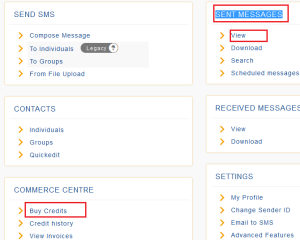
Please also note that, once your credits are finished you cannot send any messages. Then user will be required to buy credits from Bulksms.com.
Hope, the article will help you to integrate Bulk SMS API in PHP application. Thanks