
How to Embed YouTube Video Into Your Website
Embedding a YouTube video into a website can be achieved into two ways:
- Inserting YouTube iframe directly into the website html
- Convert YouTube video url into embed code
Inserting YouTube iframe directly into the website html
This is the easiest way to display YouTube video into your website.
Open any video on YouTube. Click share button at the bottom of screen and then navigate to Embed tab
Just copy the iframe code present in the box and paste into your website html code.
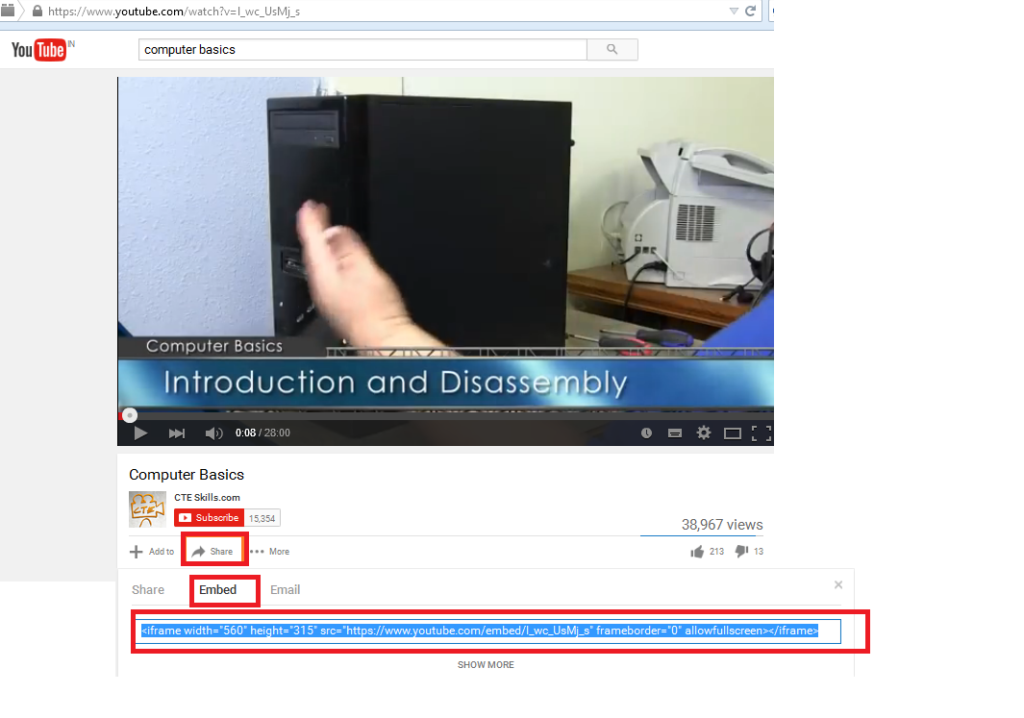
Limitation: One can only show the video, whose iframe has been added.
Convert YouTube Video URL into Embed Code
This is more useful way to show YouTube video. In This method one just need to get the YouTube video URL and with the help of code it will be automatically created into embed code url and display the video on the page.
In the example one just need to copy the YouTube video URL from the address bar and paste it into the text box. With the help of PHP code the url will be saved into the MySql table in form of embed code url and can be retrieved back to display the respective video in html iframe window.
First Create a MySql Table (to save the video url):
CREATE TABLE `utube_video` (
  `sr_no` int(30) NOT NULL,
  `video_url` varchar(255) NOT NULL
)
Code to add/update the YouTube video into the website:
<html>
<body>

<form method="post" action="">
	<br>
	Input the Youtube video url into the box<br><br>
	<input  type="text" name="video_url">

<br><br>
<input type="submit" value="save" name="submit">
</form>
</body>
 <?php
$host = "localhost";           // database  server name
$username = "root";            // database username
$password = "";                  //  database password
$db = "test";                       // database name


$con = new mysqli($host, $username, $password, $db);
// Check connection
if ($con->connect_error) {
    die("Connection failed: " . $con->connect_error);
}
	if(isset($_POST['submit']))
{
	$url = $_POST['video_url'];
$utube = preg_match('/[\\?\\&]v=([^\\?\\&]+)/',$url,$url_match); // code to convert video url into embed code
	$embed_url = 'https://www.youtube.com/embed/'.$url_match[1];
	$sql="SELECT * FROM utube_video";
	$result = $con->query($sql);
	while($row = $result->fetch_assoc())
	$video_url = $row['video_url'];
}
if(empty($video_url))
{
$sql = "INSERT INTO utube_video (video_url)VALUES ('$embed_url')";
				if ($con->query($sql) === TRUE)
				{
					echo "new record added successfully";
				}
				else
				{
				echo "Error: " . $sql . "<br>" . $con->error;
                }
}
else
{
	$sql = "UPDATE  utube_video set video_url = '$embed_url'";

				if ($con->query($sql) === TRUE)
				{
					echo "record updated successfully";
				}
				else
				{
				echo "Error: " . $sql . "<br>" . $con->error;
                }
}
}
else
{
	exit;
}

// code to get table data
$sql = "SELECT video_url FROM utube_video";
$result = $con->query($sql);
if ($result->num_rows > 0)
{
while($row = $result->fetch_assoc())
{
	$video = $row["video_url"];
}
}

$con->close();

?>
<?php
	if(isset($video))
	{
	?>
	<br>
	<iframe class="youtube-video" src="<?php echo $video ;?>" allowfullscreen></iframe>
<?php
}
?>
Using above mentioned simple ways you can easily show youtube video on your website. Hope it will help you. Thanks