
Show Marker on Google Map using Latitude and Longitude
This post will help you to understand how to show Marker on Google map using latitude and longitude in PHP. Google Map is an important feature to show the direction of the address on a web page.
You can add Google Map in an application to identify your business location or show address direction on the contact us page. This will help users to identify the exact address location direction.
To show Google Map using latitude and longitude we are including Google Map API library. This library gives access to use google maps features.
In this example, we are using static latitude, longitude and location name value to show on Google Map. Any beginner who has some basic knowledge of JavaScript, HTML and CSS, can easily implement this code in any type of application. Let’s start to learn…
Showing Google Map using Latitude and Longitude
First, create a PHP or HTML page and include google map API library in it.
<script type="text/javascript" src="https://maps.googleapis.com/maps/api/js?sensor=false&libraries=places"></script>
Now create a JavaScript code to show Google Map using latitude and longitude. In this initialize a function to load map.
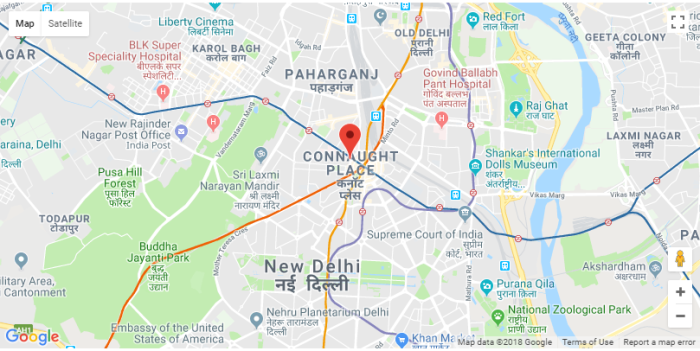
Put latitude and longitude values in google.maps.Map constructor to display the map.
To show marker on google Maps using google.maps.Marker constructor. Must include the Position property. You can animate the marker with the animation property.
Add this ‘animation: google.maps.Animation.BOUNCE’ property in marker constructor.
To display location pop up in Google Map using google.maps.InfoWindow() constructor. We put static address location in it. Check below complete JavaScript code:
<script type="text/javascript">
function initialize()
{
	// put latitude and longitude data here
   var latinfo = new google.maps.LatLng(28.631451,77.216667);
   var map = new google.maps.Map(document.getElementById('map'), {
      center: latinfo,
      zoom: 13
    });
    var marker = new google.maps.Marker({
      map: map,
      position: latinfo,
      draggable: false,
      animation: google.maps.Animation.BOUNCE,
      anchorPoint: new google.maps.Point(0, -29)
   });
    var infowindow = new google.maps.InfoWindow();
    google.maps.event.addListener(marker, 'click', function()
    {
      var iwContent = '<div id="pop_window">' + '<div><b>Location</b> : Connaught Place, New Delhi</div></div>';
      // put content to the infowindow
      infowindow.setContent(iwContent);
      // show infowindow in the google map and at the current marker location
      infowindow.open(map, marker);
    });
}
google.maps.event.addDomListener(window, 'load', initialize);
</script>
Google Map has several other types of Overlays. You can use it as per your requirement.
- Polyline – Series of straight lines on a map
- Polygon – Series of straight lines on a map, and the shape is “closed”
- Circle and Rectangle
- Custom overlays – set any initialization parameters using it
Now we need an HTML area to show Google Map on-page.
<div align="center">
<h2>Show Google Map using Latitude and Longitude</h2>
<div id="map" style="width: 60%; height: 400px;">
</div>
</div>
You May Also Like
Find & Fix Google Structured Data Errors in WordPress
Simple jQuery Barcode Generator Example
Credit Card Number Validation Using jQuery
This is quite a simple way to show Marker on Google map using latitude and longitude. Try to implement this feature on a web page or any other application.
Check the live demo and download the free source code.
Hello Harish,
Coming to Codefixup for the first time, loads of development information here, thanks for sharing your knowledge. And this article is very helpful for creating our own Google marker without using any plugin, thank you for sharing it.
Thanks Shrinivas…