
PHP Code to Search a Keyword in Whole Database
Searching a keyword in a MySql table can be easily implemented, but it has always been a cumbersome task to search a keyword in the whole database.
Moreover it is has been observed as a common need for many web application, particularly for advanced search like functionality.

Search a Keyword in Whole Database in PHP
Taking it into consideration, PHP has introduced a new class, named as “searchEntireDB”.
Just include this file into your code to make the searching of some word or a number in the whole database.
Here is the code for class “searchEntireDB” saved as searchEntireDB.php.
searchEntireDB.php
<?php

class searchEntireDB {

	protected $_query;
	protected $_sql;
	private   $_userName;
	private   $_passWord;
	private   $_dbName;
	protected $_tableName;
	protected $_connection;
	protected $_columnName;
	protected $_targetText;
	public $_finalResult;
	public $_reports;

	public function __construct($DB, $userName, $passWord, $columnName, $targetText) {
		$this->_dbName     = $DB;
		$this->_userName   = $userName;
		$this->_passWord   = $passWord;
		$this->_columnName    = $columnName;
		$this->_targetText = $targetText;

		try {
			$this->_connection = new PDO('mysql: host = localhost; dbname = ' . $this->_dbName, $this->_userName, $this->_passWord);
         $this->_connection -> exec("SET SESSION collation_connection = 'utf8_general_ci';");
			$this->_connection -> exec("SET CHARACTER SET 'utf8';");
			$this->_connection -> exec("set names utf8");
		}//try

		catch( Exception $e ) {
			die('Connection error...');
		}//catch

	searchEntireDB::searchDB();

	}// __construct()

	public function searchDB() {
		$this->_sql = 'SHOW TABLES FROM ' . $this->_dbName;
		$this->_query = $this->_connection->query($this->_sql);
		$this->_tableName = $this->_query->fetchAll();
		$tableNumber = count($this->_tableName);

		for ( $i = 0; $i <= $tableNumber - 1; $i++ ) {

			$sql2 = "SELECT * FROM " . $this->_dbName . "." . $this->_tableName[$i][0];
			$query2 = $this->_connection->query($sql2);
			$fetch = $query2->fetchAll();

			$tempDBName = $this->_tableName[$i][0];

			if ( empty($fetch) ) {

				$this->_reports['emptyDBs'][] = $tempDBName;

			}// if this DB is Empty
			else {
				$thisArrayIndexes = count($fetch);

				foreach ( $fetch as $key=>$value ) {
					if ( is_array($value) ) {

						foreach ( $value as $column=>$fieldValue ) {

							if ( $this->_columnName != NULL ) {

									$pos = strpos($fieldValue,$this->_targetText);
										if ( $column == $this->_columnName && $pos !== false ) {

									$this->_reports['result'][$tempDBName][$column] = $fieldValue;

									$this->_finalResult[] = array('DBName'=>$tempDBName, 'ColumnFoundMatch'=>$column, 'searchedFor'=>$fieldValue);

								}//Last layer

							}//if ( $this->_columnName != NULL

							else {
								if ( strpos($fieldValue,$this->_targetText) !== false ) {

									if ( is_int($column) ) {
										continue;
									}//prevent including integer keys in report and result
									else {

										$this->_reports['result'][$tempDBName][$column] = $fieldValue;

										$this->_finalResult[] = array('DBName'=>$tempDBName, 'ColumnFoundMatch'=>$column, 'searchedFor'=>$fieldValue);

									}

								}//Last layer when ColumnName is Null

							}//IF $this->_columnName ( is )--> NULL

						}//foreach ( $value as $column=>$fieldValue

					}//if ( is_array($value

				}//oreach ( $fetch as $key=>$value

				$this->_reports['notEmpty'][] = $tempDBName;

			}//else

		}//for
		 return $this->_reports;
		 return $this->_finalResult;

	}//searchDB()


}//class searchEntireDb
And here is the example code, showing the use of the above class .
<?php
require_once 'searchEntireDB.php';
$obj = new searchEntireDB('Database name','username','password',NULL,'keyword');
echo "<pre>";
print_r($obj);
?>
It is important to mention here, how you will see the results.
Here is a snapshot of the search results, that will help you to understand the output.
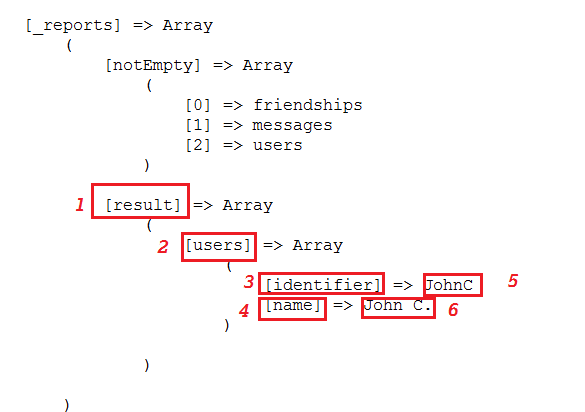
1 -> result = name of the array containing the matching results.If result array is missing, it indicates that no match found for given keyword.
2 -> users = name of the table containing the matched records
3, 4 -> identifier,name = columns of the users table, containing the matched values
5, 6 -> JohnC, John C. = the matched values
Also with his useful class, you can also find the empty and non empty tables in the searched database, resulted in form of emptyDBs and notEmpty array respectively.