jQuery File Size Validation Example
Sometimes we need to validate the file size before uploading. In this post, we are going to show a jQuery file size validation example.
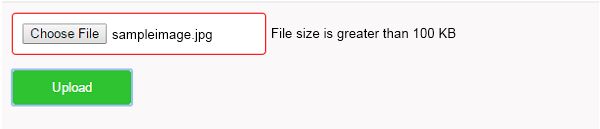
In this jQuery example, we compare the file size with a static 100 kb number. If found file size greater then defined size then show validation error.
jquery Validation for File Size
Create Submit Form
First, create a simple submit form with a file input type element.
<form method="post" action="" onSubmit="return filevalidate();">
	input type="file" name="file" id="file" class="inputBox" />
	<span id="file_size_error"></span>

	<input type="submit" id="submit" value="Upload"/>
</form>
Jquery File Size Validation Code
Now write a jquery filevalidate() function code which calls on form submit and check file size before upload in server.
function filevalidate() {
	$("#file_size_error").html("");
	$("#.inputBox").css("border-color","#F0F0F0");
	var file_size = $('#file')[0].files[0].size;
	if(file_size>12500) {
		$("#file_size_error").html("File size is greater than 100 KB");
		$(".inputBox").css("border-color","#FF0000");
		return false;
	}
	return true;
}

</script>
Output: